Showing posts with label internet tricks. Show all posts

Friday, February 3, 2012

Block Unwanted Ads and Speed Up Internet

When we are browsing internet, we saw many ads in many websites. The ads slow our internet connection and also so much irritating. Now a way to block all unwanted ads for all browser. There is a extension called "Adblock Plus" which can able to block all ads for any website. This is a very popular extension which supports in Chrome, Firefox.

Block all Ads.:
  • First visit the website : Adblock Plus
  • And download the extension for your browser and install it. After installing it a icon will show in the browser address  bar.
  • Now you are done. No ads will be display in any website.
Adblock plus is the most popular extension for ads blocking. It also win the 2011 award for ads blocking. Try this in your browser and block all unwanted ads and also speed up your internet connection. Tell your friends about this and enjoy.

Monday, January 30, 2012

Secret Message-Auto Delete After Reading

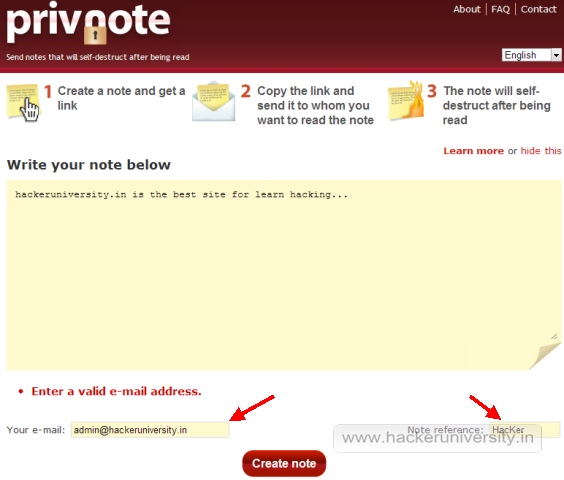
If you want to send something secret information to your friend, and if your fear about that your friend leak it to other; then there is a way to sent something secret and when your friend read the message once then the message auto delete. There is a nice feature, that you will get notification once your message is read.

How to send Auto Delete Message.:
  • First go to the website PrivNote
  • Then type the message which you want to send to your friend then check the Notify me when this note gets read button.
  • Now give your Email address and Reference name which you want to get notify. The notification willbe send to your Inbox or Spam folder.

  • After that click on Create note. After that a link will generate. Now copy the link.

  • Now email this link to your friend; this is your secret message. When your friend once read this and again click in the link it shows a warning that This note was read before.
This is a very simple trick for secret message. Now try this with you friends and tell him/her about this amazing feature and enjoy...

Saturday, January 28, 2012

Some Online tools for PDF to Doc Converting

PDF (Portable Papers format) was designed by Adobe techniques in 1993 and it popular to make proper formatting of documents. Sometimes it needs to convert the pdf  file to doc (document) file. There are many software to convert pdf file to doc file, but today we learn how it convert online.

Online PDF to Doc.:
Visit the below websites to convert your pdf document to doc;
ZamZar provides all in one converter service. This is the best service for converting document. No registration is require in this site and you can convert any format to any format of document. Tell your friends about these online services and enjoy.

Saturday, January 21, 2012

Power of Rajnikanth- Run Website without Internet

You know that Rajnikanth is a superstar and you may be also listen many jokes like the heading. But this is not a joke. there is a website of Rajnikanth which runs without internet. First connect internet then visit Rajnikanth's website the disconnect the internet.


If you want to visit this website then visit www.allaboutrajni.com and you will see the page like above screenshot. After opening the website disconnect your internet, if you don't disconnect your internet you will saw a error like below.


This is a website for fun by south Indian web designer for the superstar Rajnikanth. Must tell your friends about this website and enjoy.

Friday, January 20, 2012

150+ Free Backlinks for Your Website

If you have a website or a blog then backlinks are very important for your website. Backlinks help you to increase your website rank in search engine. Many website provide backlinks by paying money, but you can get 150+ backlinks totally free for your website.

How to Get Them.:
  • First visit SiteValueStats
  • In the submit box put your website and click on submit.
  • After clicking in submit button backlings being creating like below.
  • Don't close the the page until the submission is complete.
  • Now you have 150+ backlinks free of cost.

Sunday, January 15, 2012

Check Your User Name is Available or Not

If you are an online fanatic and has been already authorized on well-known web page you might know how challenging it is to discover a typical login name for all sites. You can discover username available in one web page but on another it may be taken. Now you can check that your username is available or not in 80 websites at a time.

How to check in 80 websites.:
  • First go to this website.: NameChk
  • In the text field type your username, which you want to check and then click on chk button.
  • Now it shows you that your your user name is available or not in 80 selected sites.
This is very useful website for username checking. Try this and enjoy...

Wednesday, January 11, 2012

Get 25% off in Bigrock New Domain

Bigrock is a online domain registration website. When you buy a domain from this you have to pay some money. If you want to buy a new domain for your website, you have a way to get your domain 25% off. This is a very simple and money reducing trick.

How to do that.:
When you are paying money through your Credit/Debit card just use the below coupon code and reduce 25% of money.
  • Coupon code- hackeruniversity.in
Look at the above screenshot. Put the coupon code hackeruniversity.in and get 25% discount and enjoy...

Thursday, December 29, 2011

Make Your Free Ringtone Online

If you want to make free ringtone online, then there are many online tool for making your own ringtone.Are you bored of hearing that factory default ringtone everyday? Then this is a time for you to change your default ringtone absolutely for free. Don't try to download your ringtone by paying money. Follow the below instruction for making your own ringtone.
Make Free Ringtone.:
  • First visit.: Make Your Own Ringtone
  • Click Browse a file and choose a music format file.
  • Place the markers to set range and clip duration.
  • If you want then change your sound quality.
  • Click selected to listen your clip.
  • Choose and set the filters if you want to change.
  • Click Make a Ringtone to convert music file to a Ringtone.

Tuesday, December 13, 2011

Now add Santa Hat to Your Blog/website

Hello Friends, there is only few days left till Christmas. Hope you are enjoying the Christmas season...
During the Christmas season you see a lot of offers and decorative things all over the online world. Some website/blog owner change their website/blog design with this season to attractive visitors. You might see that some blog owner designed their blog by adding a Santa Hat to the logo. If you have a blog/website you can also add the Santa Hat to your blog/website.

Add your Santa Hat.:
  • Now this is simple way to add santa hat to your blog. Three is website named Siteapps, which has created "Santa Hat on Logo" for your blog logo.
  • Visit this: Santa Hat on Logo and create an account after that click on Install app button.
  • A verification email with installation details will be sent to your email.
  • Read the instruction carefully to insert the santa logo to your blog.
  • Look at the above screenshot of my website. Now add your own santa logo and Enjoy.
(For any problem comment below)

Wednesday, December 7, 2011

Make your own website Directory

Want to make your own website collection with different category? There is a online tool that provide visual directory called kadaza.
It showing only the absolute best and most popular websites in many different categories. With kadaza you can customize your favorite sites with their logo and using different theme and wallpaper. Create your own start up page by dragging, dropping and adding website logos.
How to use Kadaza.:
  • Visit this page.: Kadaza
  • Search your favorite website and add then into your category.
  • Click on Settings for adding different theme and color to your directory.
  • Click on Customize for Dragging and Dropping your websites.
  • You can also add your own website to kadaza data base.
Create your own web directory and add kadaza to your homepage and enjoy...

Monday, December 5, 2011

Find many Similar Sites of a Website

If you are using one site; suppose Facebook and want to find many more sites like facebook then there is a website that can find many similar sites for your site's alternative.
The name of the website is SimilarSites. This website find from the source of internet to deliver the most similar websites according to a specific website or topic of your choice.

How to use this.:
  • In the search box Enter a URL(e.g. facebook.com, google.com).
  • Or enter your topic (e.g.Software, movie).
  • This website will find many website like your searching website or topic.

Sunday, November 27, 2011

Download YouTube Videos in Mobile/PC

If you want to download youtube videos directly to your mobile or PC without using any software in any format, then this is the correct post for you.
Youtube is the most watchable online video website in the world. You can also watch your videos in your PC or mobile. But, youtubr have no option to download your favorite videos into your mobile. You can download them in your PC using software, but in mobile there is no option. Now you can download your youtube videos directly to your Mobile or PC in many formats.
Download in Mobile.:
  • First open your Opera browser, you can also use another but opera is best for it.
  • Goto YouTube website and select any video.
  • In the address bar the video link is look like this.: m.youtube.com/watch?v=0LrT8N02vys
  • Rename it to.: ssyoutube.com/watch?v=0LrT8N02vys
  • Just remove m. using ss
Download in PC.:
  • Also same process for PC.
  • Just remove www. using ss
  • www.youtube.com/watch?v=0LrT8N02vys  ::  ssyoutube.com/watch?v=0LrT8N02vys
1. After pressing Enter in Mobile/PC a new window will open.
2. Select your Download Format and download your video.
(For any problem comment below)

Tuesday, November 22, 2011

Update Windows O/S Offline

If you are using windows O/S and you have no internet or slow connection, them how will you update your O/S.
By updating your O/S it will performs better than before and new features will be added. But, in slow connection it will take a long time to update. There is a simple trick to update your O/S offline, means you can download the update database in cyber cafe or other speed connection network then install it into your computer.

That software is called AutoPatcher Updater. AutoPatcher updater is designed to keep your system up to date. Just select from the list the available updates for your system and download them into your hard drive.

How to Update Offline.:
  • First download: AutoPatcher Updater
  • Then install it to your computer or in cyber cafe computer using pendrive.
  • It will prompt you to select your O/S for which you want to download.
  • Now select your O/S whether it is 32-bit or 62-bit. if it is 32-bit then select X86 otherwise select X64.
  • A list of all updates for your O/S will be shown.


  • Select all then click on Download buton.
  • After finishing the download just Copy/Paste all updates into your Pendrive.
  • Now insert your pendrive into your computer and install tem.
  • This is the best method to install your updates offline.

Sunday, November 20, 2011

Download FILESONIC files as Premium member

Filesonic is a most popular online file storage website. You can get many files here for download.
If you have not a member of Filesonic premium account, that means you have to wait 1 minute to download a file. After downloading a file you have to wait 15 minutes to download next file. But, if you have a Premium account then you will get high speed, no waiting for download and resume support. For a premium account you must have to pay money to Filesonic. Now here is a trick to download your file as a premium account.

How to use Filesonic as Premium.:
  • Add this below part before your download link:
        http://s1.vidfetch.pl/file.php?link=

  • For example: http://s1.vidfetch.pl/file.php?link=http://www.filesonic.com/file/3220415864/SGLANOFULL.part01.rar
Check your download link before download. Let IDM manage your download with resume and high speed support.
  • It also 100% working in Hotfile downloads.
(It's working for you or not, please comment below)

Wednesday, November 16, 2011

Create Many Accounts in Facebook Using 1 Email ID

If Facebook or any other Forum/website block your account then what will you do at that time, if you have no other email id.
This is a very simple trick. For that trick you must have a Gmail ID. You can create many more account in facebook or other forum with one Gmail ID.

How to Do this.:
  1. Create an email id in Gmail or If you have an existing email the you can use it.
  2. Signup Facebook with that Gmail id.
  3. Then a confirmation email will sent to your Gmail id, you can active your account in this email.
  4. If you want to create an another account with same Email id, then follow the below steps.
  • suppose your email id is yourmail@gmail.com , then in the Signup box put it like this:
          your.mail@gmail.com
  • You can use many dots (.) in your Gmail in Signup process.
  • You can also use yourmail+123@gmail.com , you can add many number as you like after Plus (+).
  • After that the confirmation email will send to your main email id (yourmail@gmail.com).
Create many accounts in Facebook or other Forums with one Email id.
(For any problem comment below)

Saturday, November 5, 2011

Get a Free .in Domain for 1 year from Google

Are you interested to get a free domain ? Then you can get a .in domain from google with 1 year free hoasting.
Google in partnership with HostGator and ICICI bank, revealed a new service called India Get Online . Where you can setup for a Business or a personal use for free. With this amazing offer you will get a .in domain + webhosting for 1 year Free by Host gator.

Now everyone will try to get Domains, free of cost. You will register a free .in domain name and you have to provide them with a valid PAN card numbar and every individual is provided with a single PAN card number, so he can Register 1 domain at a time.

India Get Online Offer.:
  • A free, easy to build, professional website
  • A free .in domain name and Hosting for 1 year
  • Free email addresses
  • Free online tools and resources
So, if you want to change the hosting you can do that by changing your Host from Hostgator to anyone. Your website will also be integrated with google apps and you can take benefit of every google products. After 1 year if you want to continue your website then you have to renew your service with Hostgator with special Discount offer.