Showing posts with label facebook. Show all posts

Saturday, February 4, 2012

Increase Your Facebook Page Likes Free

Do you want to increase your website traffic, then Facebook is the perfect station for increasing your traffic source. If you have a website then sure you have a Facebook fan page. Many people want to know that, how to increase there Facebook fan page likes free of cost? There is a simple way to increase the likes of a your fan page. You can also increase your twitter and Google + followers instantly.

Increase Facebook Likes Free.:
  • Visit this website : IncreaseFacebookLikes
  • Now create an account here. After that a confirmation code will be send to your email id.
  • Put the code in the website and active your account. After that you will get free 50 points.
  • Go to Facebook tab and add your page. Your Facebook page likes increase automatically.
  • Refer more friends and increase your points and increase you likes.
  • Daily you can get 50 points free.
You can also add your twitter and Google + account here. Daily visit this website and like other pages to increase your page like. Spread your referal link, and earn 50 points per refer. Tell your friends about that and  enjoy.

Wednesday, February 1, 2012

All Facebook Smiley Codes For Chatting

We all are using Facebook, but still a lot of user don't know how to use smiley in Facebook chat. Many people think about that, how other people send smiley in Facebook chat. But it is very simple to use smiley in Facebook chat. There are many codes for smiley, you just enter your code in Facebook chat and it will automatically changed into smiley. Many of you know about some smiley code, look at the below picture for all smiley code set for your Facebook chat.

Smiley Code Set
Try the above code in Facebook chat, also tell your friends about this and enjoy chatting.

Tuesday, January 24, 2012

Forget Black and use Color Text in Facebook Chat

Facebook is the best platform for chatting with friends. There are many tricks related Facebook chat. Today I am going to post another Facebook chat trick for you. When you type any text in Facebook chat box it will display in black color, but if you want then you can write them in color format.

[[107015582669715]] = A

[[116067591741123]] = B

[[115602405121532]] = C

[[112542438763744]] = D

[[115430438474268]] = E

[[109225112442557]] = F

[[111532845537326]] = G

[[111356865552629]] = H

[[109294689102123]] = I

[[126362660720793]] = J

[[116651741681944]] = K

[[115807951764667]] = L

[[106596672714242]] = M
[[108634132504932]] = N

[[116564658357124]] = O

[[111669128857397]] = P

[[107061805996548]] = Q

[[106699962703083]] = R

[[115927268419031]] = S

[[112669162092780]] = T

[[108983579135532]] = U

[[107023745999320]] = V

[[106678406038354]] = W

[[116740548336581]] = X

[[112416755444217]] = Y

[[165724910215]]       = Z

Use the above codes in the chat box and see the magic of color. If you want to write a word, then keep a space in every code and write them sequentially. Look at the below picture.:
When you enter any code from above box it automatically converts into a small square box. These codes are only shows in computer. Try them with your friends and enjoy.

Monday, January 23, 2012

Facebook Blue Text Status Update Trick [New]

Hello friends, the old Facebook status in blue text not working now. But there is a solution for that problem. Now you can update your status in blue color text. The concept of the trick is the same as the before trick. Read the below line carefully and update your status in blue color.

Trick for Blue Text.:
  • First log in to Facebook
  • Go to status update field and paste the below code:
          @@[0:[227459600648740:1: Your Text Here]]
            @[227459600648740:]
  • Replace "Your Text Here" with your own text.
Now click on post button and see the magic. Share this trick with your friends and enjoy...

Tuesday, January 17, 2012

Facebook Profile ID behind an Username

When we register in Facebook, there is a default user id for every profile or page. The user id is so much difficult to remember. So we remove the user id with a simple username. In some trick in Facebook we need the Facebook user id, in this case what'll we do?

Know any Profile Id.:
Facebook user id look like this www.facebook.com/profile.php?id=1234512345
1. First log in to Facebook
2. Copy the below address and remove username with your username.
    https://graph.facebook.com/username
Ex: https://graph.facebook.com/www.hackeruniversity.in
This is a very simple trick to find out the profile id behind a user name. Share this with your friends and enjoy.

Thursday, January 12, 2012

Funny Facebook Mobile Number Trick

Hello friends, today I am going to tell you a funny trick of Facebook. You know that every SIM card is registered with the name of the SIM owner. Now you can check the name behind a sim with facebook. This is really funny, now follow the below steps.

How to do that.:
  • First log in into your facebook account.: Facebook
  • Now click on Update status and in this box type your last 4 digit of your mobile number in below format.
  • Suppose your mobile number is 9936346027 , then your last 4 digit is 6027. Type it like this.: @[6027:0] and click on post. You can see the name.
This is not the real name of your sim owner. This is a trick for fun. You can share this with your friends and enjoy.

Monday, January 9, 2012

Facebook Auto Like Status Extension

If you are a great fan of Facebook then it will help you. Now you don't need to confirm single friendship request on Facebook. You can confirm all friend request at a time in a single click and also you can like and unlike your all friends status at a time by using this simple script. It works only in Firefox and Chrome web browser in computer.

How to add Auto Like.:
1. Before installing this script you have to install an Extension for Firefox and Chrome.
2. For Firefox user.: Install GreaseMonkey
3. For Chrome user.: Install TemperMonkey
4. After that Restart your browser.
Now click on below download button to install your Facebook Like script. It shows left-bottom of your browser (Look at the above screenshot).

100 Boys Profile For your Facebook Profie

Hello friends, Facebook profile picture is your first impression for other Facebook user. Here is 100 boys attractive profile pictures for your profile. Look at the below screenshot and click on below download button to download the archive.

Saturday, January 7, 2012

Useful Facebook Privacy Setting tips in Cartoon

A useful privacy setting tip for your Facebook account. It generate from a website called ShoeboxBlog and it is very helpful for your account setting. Read the below message in the picture carefully.
Source: ShoeboxBlog

Thursday, December 29, 2011

Add your own Picture in Facebook Chat

Hello friends, now Facebook is the most needed social networking website in the world for it's amazing features.Facebook chat is the most using chatting station. There are many tricks for Facebook chat. Today I am going to tell you; how to add your profile picture in your Facebook chat box. This is a very simple and useful trick. Follow the below instruction.

Add your Picture in Facebook chat.:
  • First log on to.: Facebook
  • In the chat box paste the below code for hacker university logo in Facebook chat.
         [[227459600648740]] and press Enter.

--------------Press Enter----------------
  • For your own Facebook profile picture paste your user name like this.: 
        [[your user name]]
  • You also put your friend's user name for your friend's profile picture. Now enjoy Facebook chatting with picture.
(For any problem comment below)

Sunday, December 25, 2011

Facebook Messenger Official Download for Desktop

Facebook is the world's no 1 social networking website. Now Facebook release an application for desktop called Facebook Messenger.
Facebook messenger is an official tool for notification management for Facebook. This application offers you to Chat, Messaging and Notifications. After you download this application, install it in your computer then log in here using your log in id and password. Look at the below screenshot.
This application may not be compatible in 64-bit operating systems but it working perfect in 32-bit operating systems. Try this in your system and enjoy with facebook.

Saturday, December 3, 2011

Now Update Facebook status in Blue Color

In earlier time I have posted that how to post blank status message in Facebook. There are many tricks for status updates in facebook.

Today I am going to post a new trick related to facebook status update. That trick is celled "Facebook Blue color status update". You can post your status in blue color. This is a very simple trick and amazing, now impress your friends with this. Just follow the below steps to learn this trick.
How to post Blue color Status Update.:
  • First login to your Facebook account.
  • Now goto Update status link and paste the below code:
       @@[0:[227459600648740:0: YOUR TEXT HERE ]]
  • Remove "YOUR TEXT HERE" with your own text and click on share.
  • Now see the magic. Your post will show blue color text. Copy the code below.:
                                         COPY CODE HERE

      Wednesday, November 23, 2011

      Disable Notification of any Facebook Group

      Facebook Groups is a uppercase site to unite with like minded fill. But if you individual linked a puffy forgather which is too oft updated by its users then it can be irritating.
      You testament get notifications every instance somebody posts into group.The unsurpassable medicine is to incapacitate (or customize) the notifications from the group.
      How to disable it.:
      • Login into: Facebook Account
      • Click on any Group in Homepage which you want to disable Notification.
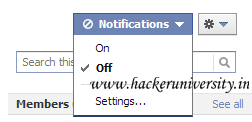
      • At the upper right corner you see a notification button. Click on that button and select Off.

      • In that way you can stop the notification of a group in Facebook.

      Tuesday, November 15, 2011

      Facebook Magic Number Trick

      Facebook Magic number trick is becoming a rage in Facebook. These magic magic numbers are nothing, but the ID numbers of Users, Pages or Groups.
      When you paste these magic number in your status it automatically converted into your Profile, Group or Page link.

      How to add your Magic Number.:

      • Login to your Facebook account.
      • Goto your profile/page link or Friend profile link and look at the ID number in the Facebook url. Look at the below screenshot.


      • Copy the ID number and replace it with the follow brown color number.
               @[ID:0:]
      • Suppose your ID number is 233030670084621 , then replace it like below code.
               @[233030670084621:0:]
      • Now, tell your friends to copy/paste this code in the status or in comment section, then press Enter.
      • Now see the magic.
      (For any problem comment below)


      Thursday, November 10, 2011

      Set Long Height Profile Picture In Facebook Account

      Your Facebook profile picture is the first impression on whoever visit your profile first time. Everyone wants to set a Stylish and Attractive Display Picture on their facebook account, fan pages and groups. Here is the very old online tool by which you can set a long height profile picture in Facebook. With this tool you can also Re-size, Add special effects and Download the picture in your computer.

      How to set Long Height Picture.:

      • First go to this website: ProfilePictureMaker
      • Then Click on Load Photo button if you want to take a picture from your Computer, otherwise click on Use Webcam to take picture.


      • Now Configure and Edit your photo as you want.
      • Click on Login to FB button to set this picture as your Display Picture.


      • Give your Username and Password to login your facebook account and click on Allow button in the Permission and Request section.
      • Now your edited image will be set as Profile Picture.
      • If you don't want this picture for now then click on the Download Pic button. This will download the picture in your computer and you can set this image as your Profile Picture later whenever you want.

      Wednesday, November 9, 2011

      Make Facebook Account like Google+

      Google+ has the concept of using circles to organize friends. Now a new facebook application, Circle Hack has tried to copy this feature.
      It provides graphical interface like Google+ circle with the Drag and Drop feature. But the functionality provided by circle hack is as compared to Google+.

      In Google+ you can control who can see your updates using the circles but in Facebook this function can be performed by Circle Hack instead you have to Control these settings from Privacy settings. So the Circle Hack is nothing more than a convenient way to organize your Friends in Facebook groups.


      How to use Facebook Circle Hack?
      • Login into your: Facebook Account
      • Now Open: Facebook Circle Hack
      • Click on the Login Button. It will ask you grant permissions.
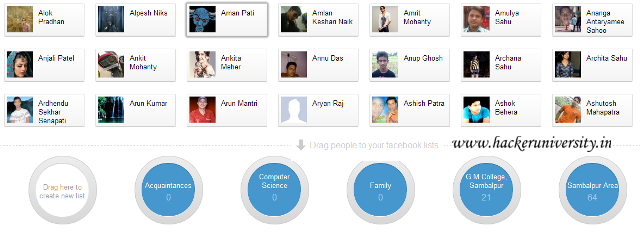
      • After Granting permission by click on Allow button you can see all your friends in the upper half of screen and circles at the bottom half.
      • Now you can create new groups by clicking on the Create List in the first circle.
      • After creating a group Drag and Drop your Friends from the upper half of the screen to circle.
      Share this Circle Hack trick with your Friends and Enjoy.